quartify

Transform your R scripts into Quarto documentation

Damien Dotta

๐Ÿ“ฆ What is quartify?

An R package that automatically converts your R scripts into Quarto documents (.qmd)

๐Ÿ’ก The idea: Generate HTML documentation from commented R scripts

๐ŸŽฏ The goal: Keep scripts as clean and familiar as possible while making them compatible with the Quarto ecosystem.

๐Ÿค” The problem

  • ๐Ÿ“ R scripts with useful comments but hard to read
  • ๐Ÿ‘ฅ Difficult to share with non-developers
  • ๐Ÿ“Š Complex analyses poorly documented
  • ๐Ÿ”„ Duplication between code and documentation
  • โฐ Time wasted manually creating documentation

โœจ The quartify solution

  • Automation: R โ†’ Quarto conversion in one click
  • Preservation: Structure and comments retained
  • Enhancement: HTML rendering
  • Flexibility: R functions, RStudio addins as Shiny apps, a web version (no installation required)
  • Scalability: From simple scripts to Quarto Books

๐ŸŽฏ Why Quarto?

  • ๐Ÿš€ Official successor to R Markdown (new syntax and features)
  • ๐ŸŽจ 25 themes ready to use
  • ๐Ÿ“ Diagrams: Built-in Mermaid (flowcharts, sequencesโ€ฆ)
  • ๐Ÿ“ฑ Responsive: Adapts to all screens
  • ๐Ÿ”ฎ Future-proof: Active development and growing community

๐ŸŽฏ Use cases

1. Technical documentation

  • ๐Ÿ“ Transform R scripts โ†’ Navigable HTML documentation
  • ๐Ÿ” Easier code reviews for teams
  • ๐Ÿ‘ฅ Share analyses between peers

๐ŸŽฏ Use cases

2. Project management

  • ๐Ÿ“š Create Quarto Books for complex projects
  • ๐Ÿ—‚๏ธ Centralized and navigable documentation
  • ๐Ÿ”„ CI/CD integration for up-to-date docs

๐Ÿš€ Main features

  • ๐Ÿ“ R โ†’ Quarto conversion: Scripts to .qmd
  • ๐Ÿ—‚๏ธ RStudio Sections: Automatic recognition
  • ๐Ÿ’ฌ Preserved comments: Text in the final document
  • ๐Ÿ”ข Line numbers: Access to line numbers in the original R script
  • ๐Ÿ“Š Static code blocks
  • ๐Ÿ“‘ Table of contents: Automatic
  • ๐ŸŽจ Customizable YAML: Title, author, theme, options
๐Ÿš€ Main features (continued)

  • ๐ŸŒ HTML rendering: Optional with automatic opening
  • ๐ŸŽญ 25 Quarto themes: Visual customization
  • ๐ŸŽจ Callouts: Notes, tips, warningsโ€ฆ
  • ๐Ÿ“‘ Tabsets: Organization in tabs
  • ๐Ÿ“Š Mermaid Diagrams: Flowcharts, sequencesโ€ฆ
  • ๐Ÿ” Code quality: styler/lintr integration

๐Ÿš€ Main features (continued)

  • ๐Ÿ“‚ Batch conversion: Entire directories
  • ๐Ÿ”ง RStudio Add-in: IDE integration
  • ๐Ÿ–ฅ๏ธ Shiny interface: usable from any IDE
  • ๐ŸŒ Web version: No installation required
  • ๐Ÿ“š Quarto Books: Directories to navigable books
  • ๐Ÿค– Automation: CI/CD compatible

๐Ÿ› ๏ธ Installation

From GitHub (development version)

# Install devtools if necessary
install.packages("devtools")

# Install quartify
devtools::install_github("ddotta/quartify")

# Load the package
library(quartify)

๐Ÿ› ๏ธ Installation (continued)

From CRAN (when available)

install.packages("quartify")
library(quartify)

Note

Currently in development - use GitHub

๐ŸŒ Web Version - No installation required!

๐Ÿš€ Try it now!

https://quartify.lab.sspcloud.fr/

โœ… No R installation required
โœ… Complete web interface
โœ… All features available

๐ŸŒ Web version features

  1. File upload: One or multiple R scripts
  2. Directory conversion: Select an entire folder
  3. Book creation: Automatic generation of Quarto books
  4. Configuration: Title, author, theme, rendering options
  5. Download: .qmd, .html, or complete .zip archive

๐ŸŒ Web version advantages

  • Accessible: From any browser
  • Fast: No local setup required
  • Shareable: Send the link to your colleagues
  • Up-to-date: Always the latest version
  • Risk-free: No installation on your machine
  • Demo: Perfect for testing before installation

๐Ÿ’ป Three ways to use quartify

1๏ธโƒฃ Shiny Interface

library(quartify)
quartify_app()  # Launch the application in the browser

Target audience: Users who prefer a graphical interface and use an IDE other than RStudio

๐Ÿ’ป Three ways to use quartify

2๏ธโƒฃ RStudio Add-in

  1. Open an R script in RStudio
  2. Addins menu โ†’ Convert R Script to Quarto

Target audience: Users who prefer a graphical interface and integrated workflow in RStudio

๐Ÿ’ป Three ways to use quartify

3๏ธโƒฃ Command line (CLI)

library(quartify)
rtoqmd("my_script.R", "output.qmd")

Ideal for: Scripts, CI/CD automationโ€ฆ

๐Ÿ’ป Shiny Interface - Details

โ€œConvert a fileโ€ tab

  • ๐Ÿ“ Select R source file
  • ๐Ÿ“ Configure output name
  • โš™๏ธ Options: title, author, format, theme
  • ๐ŸŽจ Choose theme from 25+ available
  • ๐Ÿ”ง Advanced options: numbering, table of contents
  • ๐Ÿ“Š Rendering options: HTML, auto-open

๐Ÿ’ป Shiny Interface - Details (continued)

โ€œConvert a directoryโ€ tab

  • ๐Ÿ“‚ Select a directory of scripts
  • ๐Ÿ“š โ€œCreate a Quarto Bookโ€ option (default)
  • ๐Ÿ—‚๏ธ Configure output directory
  • โš™๏ธ Common options: author, theme, rendering
  • ๐ŸŒ Optional HTML generation for all files

๐Ÿ’ป Shiny Interface - Details (continued)

โ€œConvert multiple filesโ€ tab

  • ๐Ÿ“ Upload multiple R files at once
  • ๐Ÿ“ฆ Batch processing
  • ๐Ÿ“š โ€œCreate a Quarto Bookโ€ option
  • ๐Ÿ’พ Download a complete ZIP archive
  • โš™๏ธ Unified configuration for all files

๐Ÿ”ง Main function: rtoqmd()

Basic syntax

rtoqmd(
  input_file,           # R source file
  output_file = NULL,   # Output .qmd file (auto if NULL)
  title = NULL,         # Document title
  author = NULL,        # Author
  format = "html",      # Output format
  theme = "cosmo",      # Quarto theme
  render = TRUE,        # Generate HTML?
  open_html = TRUE      # Open HTML automatically?
)

๐Ÿ”ง rtoqmd() parameters

Basic parameters

  • input_file: Path to R source script
  • output_file: .qmd file name (default: same name)
  • title: Title in YAML header (otherwise from metadata or filename)
  • author: Author (otherwise from metadata)
  • format: currently only โ€œhtmlโ€

๐Ÿ”ง rtoqmd() parameters (continued)

Customization parameters

  • theme: Among 25 Quarto themes (default: โ€œcosmoโ€)
  • number_sections: Number sections? (default: FALSE)
  • show_source_line: Display original line numbers in code chunks (default: TRUE)
  • toc: Include table of contents? (default: TRUE)
  • toc_title: TOC title (default: โ€œContentsโ€)
  • toc_depth: TOC depth (default: 3)

๐Ÿ”ง rtoqmd() parameters (continued)

Output parameters

  • render: Generate HTML? (default: TRUE)
  • output_html_file: Output HTML filename
  • open_html: Open HTML? (default: TRUE)
  • use_styler: Display formatting suggestions (default: FALSE)
  • use_lintr: Display quality issues (default: FALSE)
  • โš  apply_styler: Apply formatting (default: FALSE)

๐Ÿ’ป Usage examples

Example 1: Simple conversion

# Basic conversion with HTML rendering
rtoqmd("analysis.R")

# Generates: analysis.qmd + analysis.html
# Opens HTML in browser

๐Ÿ’ป Usage examples

Example 2: Without HTML rendering

# Generate only the .qmd
rtoqmd("analysis.R", 
       render = FALSE)

# Generates: analysis.qmd only

๐Ÿ’ป Usage examples

Example 3: Full customization

rtoqmd(
  input_file = "my_script.R",
  output_file = "detailed_report.qmd",
  title = "Statistical Analysis of 2024 Sales",
  author = "Data Science Team",
  format = "html",
  theme = "flatly",
  number_sections = TRUE,
  render = TRUE,
  output_html_file = "docs/sales_report_2024.html",
  open_html = TRUE
)

๐Ÿ’ป Usage examples

Example 4: With quality check

rtoqmd(
  input_file = "analysis.R",
  output_file = "analysis.qmd",
  use_styler = TRUE,    # Display style suggestions
  use_lintr = TRUE,     # Display quality issues
  render = TRUE
)

# Generates tabsets with:
# - Original code
# - Formatted code (suggestion)
# - Quality issues

๐Ÿ“‚ Directory conversion: rtoqmd_dir()

Syntax

rtoqmd_dir(
  input_dir,              # Directory containing .R files
  output_dir = NULL,      # Output directory (default: input_dir)
  create_book = TRUE,     # Create a Quarto Book?
  author = NULL,
  render = TRUE,
  output_html_dir = NULL,
  exclude_pattern = NULL  # Pattern to exclude files
)

๐Ÿ“‚ Directory conversion examples

Example 1: Simple directory conversion

# Convert all .R files in a directory
rtoqmd_dir("scripts/analyses")

# Generates:
# - A .qmd for each .R
# - A Quarto Book with navigation
# - HTML for each file

๐Ÿ“‚ Directory conversion examples

Example 2: Without creating a Book

# Just convert files individually
rtoqmd_dir("scripts/", 
           create_book = FALSE)

# Generates a .qmd and .html for each .R
# No book structure

๐Ÿ“‚ Directory conversion examples

Example 3: With file exclusion

# Exclude test files
rtoqmd_dir(
  input_dir = "scripts/",
  exclude_pattern = "^test_.*\\.R$", 
  author = "Data Team",
  theme = "darkly"
)

# All R files whose name starts with test_ will be ignored

๐Ÿ“‚ Batch conversion examples

Example 4: Custom organization

# Output to a dedicated directory
rtoqmd_dir(
  input_dir = "R/analyses/",
  output_dir = "documentation/",
  output_html_dir = "docs/html/",
  create_book = TRUE,
  author = "My team",
  theme = "cosmo",
  render = TRUE
)

๐Ÿ“š Quarto Books - What are they?

  • Link to documentation
  • ๐Ÿ“– Book structure: Chapters, parts, navigation
  • ๐Ÿ—‚๏ธ Automatic sidebar: Navigation between all files
  • ๐Ÿ” Integrated search: Search across the entire book
  • ๐Ÿ“ฑ Responsive design: Adapted for mobile/tablet/desktop
  • ๐ŸŽจ Customizable: Themes, logo, favicon
  • ๐ŸŒ Easy publishing: GitLab/GitHub Pages, Netlify, Quarto Pubโ€ฆ

๐Ÿ“š Quarto Book structure

_book/
โ”œโ”€โ”€ _quarto.yml          # Book configuration
โ”œโ”€โ”€ index.qmd            # Home page
โ”œโ”€โ”€ chapter1.qmd         # Chapter 1
โ”œโ”€โ”€ chapter2.qmd         # Chapter 2
โ””โ”€โ”€ ...

quartify automatically generates this structure from your R scripts!

๐Ÿ“š Automatic Book creation

# Active by default with rtoqmd_dir()
rtoqmd_dir("scripts/")

# Generates:
# - _quarto.yml with configuration
# - index.qmd as home page
# - One chapter per R script
# - Navigation in sidebar

๐Ÿ“š Generated _quarto.yml content

project:
  type: book
  output-dir: _book

book:
  title: "Documentation"
  author: "Your name"
  chapters:
    - index.qmd
    - chapter1.qmd
    - chapter2.qmd

format:
  html:
    theme: cosmo

๐Ÿ“š Quarto Books advantages

  • ๐ŸŽฏ Clear organization: Structure complex projects
  • ๐Ÿ“– Smooth navigation: Between all chapters
  • ๐Ÿ” Global search: Across all content
  • ๐Ÿ“ฑ Optimal experience: Reading on all devices

๐Ÿ“ R source script format

# Title: Analysis title
#
# Author: Your name
#
# Date: 2025-12-10
#
# Description: Detailed description
# of what this script does
#

## Main section ####

# Explanatory comment

code_r <- "example"

๐Ÿ“ Metadata (optional)

At the beginning of the script

# Title: Iris Data Analysis
#
# Author: Jane Doe
#
# Date: 2025-12-05
#
# Description: This analysis explores the differences
# between the three iris species using
# advanced statistical methods.
#

Note

If absent, quartify uses the filename as title

๐Ÿ“ Sections and subsections

RStudio syntax

## Level 2 title (Heading 2) ####

### Level 3 title (Heading 3) ====

#### Level 4 title (Heading 4) ----

Important

Minimum 4 symbols at the end (#, = or -)

๐Ÿ“ Section hierarchy

# Level 1 title (YAML document title)

## Data import ####

### CSV reading ====

#### Quality check ----

## Exploratory analysis ####

### Descriptive statistics ====

๐Ÿ“ Comments โ†’ Text

Basic rule

# This comment alone on its line
# becomes text in the Quarto document

iris |> filter(Species == "setosa")

Becomes in the .qmd:

This comment alone on its line
becomes text in the Quarto document

```{.r}
Line 4
iris |> filter(Species == "setosa")
```

๐Ÿ“ Inline comments (in code)

iris |> 
  # This comment with space before stays in code
  filter(Species == "setosa") |>
  select(Sepal.Length)  # End-of-line comment also stays

Warning

Comments preceded by space or at end of line stay in the code block!

๐Ÿ“ Conversion examples

R script

## Descriptive analysis ####

# Calculate basic statistics

summary(iris)

# The summary() function provides:
# - Minimum and maximum
# - Quartiles
# - Mean

### Species distribution ====

table(iris$Species)

๐Ÿ“ Generated Quarto document

## Descriptive analysis

Calculate basic statistics

```{.r}
Line 5
summary(iris)
```

The summary() function provides:
- Minimum and maximum
- Quartiles
- Mean

### Species distribution

```{.r}
Line 14
table(iris$Species)
```

RStudio Snippets

Install useful code snippets for faster R script writing with install_quartify_snippets().

After installation and RStudio restart, you can use:

  • header + Tab: Insert a document metadata template
  • callout + Tab: Insert a callout template
  • mermaid + Tab: Insert a Mermaid diagram template
  • tabset + Tab: Insert a tabset template

๐ŸŽจ Callouts - What are they?

Note

Highlighted text blocks to draw attention

Tip

Advice and best practices

Warning

Important points requiring vigilance

๐ŸŽจ Callouts syntax

In the R script

# callout-note - Callout title
# Callout content over multiple lines.
# Each line starts with #
# 
# Can include paragraphs.

code_after_callout <- "example"

๐ŸŽจ Callout types

5 available types

# callout-note - General information
# callout-tip - Advice, tip
# callout-warning - Attention required
# callout-caution - Caution needed
# callout-important - Crucial point

๐ŸŽจ Callout example

R script

## Data loading ####

# callout-important - Prerequisites
# Make sure you have installed the readr package:
# install.packages("readr")

library(readr)
data <- read_csv("file.csv")

๐ŸŽจ Callout rendering

Prerequisites

Make sure you have installed the readr package:
install.packages("readr")

library(readr)
data <- read_csv("file.csv")

๐Ÿ“Š Mermaid Diagrams

What is Mermaid?

  • ๐Ÿ“ Diagram language: Simple Markdown-like syntax
  • ๐ŸŽจ Automatic rendering: Generated during Quarto rendering
  • ๐Ÿ”„ Natively integrated: No extension required
  • ๐Ÿ“Š Multiple types: Flowcharts, sequences, Gantt, classesโ€ฆ

๐Ÿ“Š Mermaid syntax in quartify

In the R script

#| mermaid
#| eval: true
flowchart TD
    A[Start] --> B[Processing]
    B --> C{Decision}
    C -->|Yes| D[End]
    C -->|No| B

Note

Use #| tags for chunk options

๐Ÿ“Š Mermaid diagram types

Flowchart

#| mermaid
#| eval: true
flowchart LR
    A[Raw data] --> B[Cleaning]
    B --> C[Analysis]
    C --> D[Visualization]
    D --> E[Report]

๐Ÿ“Š Mermaid diagram types

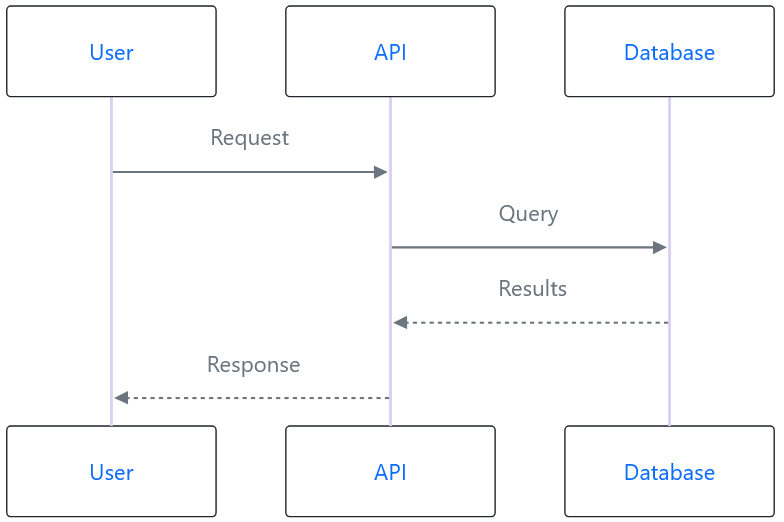
Sequence diagram

#| mermaid
#| eval: true
sequenceDiagram
    User->>API: Request
    API->>Database: Query
    Database-->>API: Results
    API-->>User: Response

๐Ÿ“Š Mermaid diagram types

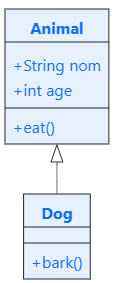
Class diagram

#| mermaid
#| eval: true
classDiagram
    class Animal {
        +String name
        +int age
        +eat()
    }
    class Dog {
        +bark()
    }
    Animal <|-- Dog

๐Ÿ“Š Mermaid diagram types

Gantt (planning)

#| mermaid
#| eval: true
gantt
    title Project planning
    dateFormat YYYY-MM-DD
    section Phase 1
    Data collection :2025-01-01, 30d
    Cleaning        :2025-01-31, 20d
    section Phase 2
    Analysis        :2025-02-20, 30d

๐Ÿ“‘ Tabsets - Organization in tabs

What are they?

  • Link to documentation
  • ๐Ÿ“‘ Interactive tabs: Organize content
  • ๐Ÿ‘† Clickable: User chooses what to see
  • ๐ŸŽฏ Space saving: Avoid too much scrolling
  • ๐Ÿ“Š Comparison: Display different views

๐Ÿ“‘ Tabsets syntax

In the R script

# tabset

# tab - Tab 1
# Description of first tab

code_tab1 <- "example"

# tab - Tab 2
# Description of second tab

code_tab2 <- "another example"

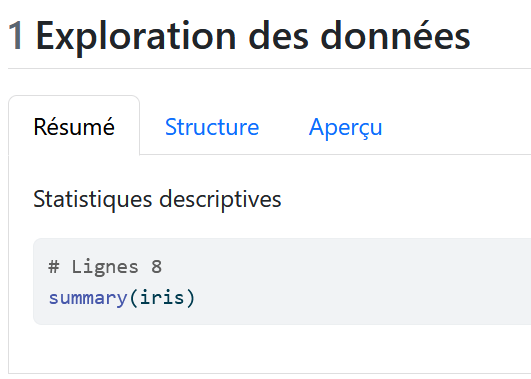
๐Ÿ“‘ Tabset example

R script

## Data exploration ####

# tabset

# tab - Summary
# Descriptive statistics

summary(iris)

# tab - Structure
# Dataset structure

str(iris)

# tab - Preview
# First rows

head(iris)

๐Ÿ“‘ Tabset rendering

๐Ÿ” Code quality - styler

What is styler?

  • โœจ Automatic formatting: Follows the tidyverse style guide
  • ๐ŸŽฏ Consistency: Uniform code throughout the project
  • ๐Ÿ“ Readability: Indentation, spaces, line breaks
  • ๐Ÿ”ง Integrated in quartify: Display or apply formatting

๐Ÿ” Using styler

Option 1: Display suggestions

rtoqmd("script.R", 
       use_styler = TRUE)

# Generates a tabset with:
# - "Original code": Your code
# - "Formatted code": Styled version

Note

Does NOT apply modifications, just a suggestion

๐Ÿ” Using styler

Option 2: Apply directly

rtoqmd("script.R", 
       apply_styler = TRUE)

โš ๏ธ Warning!

Modifies the R source file directly. Make a backup!

๐Ÿ” styler formatting example

Before (original)

x=1+2
if(x>0){
print("positive")}
df<-data.frame(a=1:3,b=4:6)

After (formatted)

x <- 1 + 2
if (x > 0) {
  print("positive")
}
df <- data.frame(a = 1:3, b = 4:6)

๐Ÿ” Code quality - lintr

What is lintr?

  • ๐Ÿ” Static analysis: Detects potential problems
  • โš ๏ธ Warnings: Syntax, style, potential errors
  • ๐Ÿ“Š Best practices: Recommended R conventions
  • ๐Ÿ”ง Integrated in quartify: Displays issues in a tabset

๐Ÿ” Using lintr

rtoqmd("script.R", 
       use_lintr = TRUE)

# Generates a tabset with:
# - "Original code": Your code
# - "Issues": List of detected problems

๐Ÿ” Combining styler + lintr

rtoqmd("script.R", 
       use_styler = TRUE,
       use_lintr = TRUE)

# Generates a tabset with 3 tabs:
# - "Original code"
# - "Formatted code" (styler suggestion)
# - "Issues" (lintr problems)

Tip

Perfect for code review!

๐Ÿ” Types of problems detected by lintr

  • ๐Ÿšซ Syntax: Code errors
  • ๐Ÿ“ Line length: > 80 characters
  • ๐Ÿ”ค Naming: Naming conventions
  • โš ๏ธ Unused variables
  • ๐Ÿ”„ Duplicated code
  • ๐Ÿ“ฆ Packages: Missing dependencies
  • ๐ŸŽจ Style: Indentation, spacesโ€ฆ

โœ๏ธ Using apply_styler

  • โš ๏ธ The apply_styler parameter allows you to permanently format your R script files according to the tidyverse style guide.
  • The apply_styler parameter only works if use_styler = TRUE.
  • If you set apply_styler = TRUE but use_styler = FALSE, you will receive a warning and the source file will not be modified.
  • The source file is modified BEFORE conversion
  • The formatted file is then used for conversion to .qmd

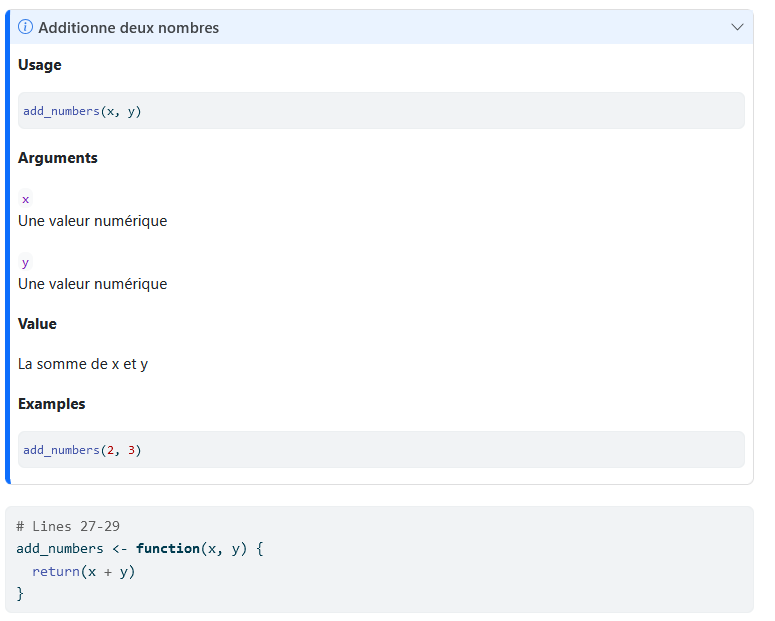
styler and lintr rendering

๐ŸŽจ Available Quarto themes

Light themes (19)

cosmo, flatly, journal, litera, lumen, lux, materia, minty, morph, pulse, quartz, sandstone, simplex, sketchy, spacelab, united, vapor, yeti, zephyr

Dark themes (6)

darkly, cyborg, slate, solar, superhero, vapor

๐ŸŽจ Choosing a theme

With the interface

  • Dropdown menu with preview
  • Real-time preview

From command line

rtoqmd("script.R", theme = "flatly")

๐ŸŽจ Theme examples

โ€œcosmoโ€ theme (default)

  • ๐ŸŽจ Modern and clean design
  • ๐Ÿ“ฑ Very responsive
  • ๐Ÿ”ต Professional blue palette

โ€œdarklyโ€ theme

  • ๐ŸŒ™ Dark background (dark mode)
  • ๐Ÿ‘๏ธ Comfortable for the eyes
  • ๐Ÿ’ป Appreciated by developers

๐Ÿ”„ CI/CD Integration

Why automate?

  • ๐Ÿ“… Always up-to-date documentation: With every commit
  • ๐Ÿค– No forgetting: Automatic
  • ๐Ÿ‘ฅ Collaboration: Whole team benefits
  • ๐Ÿš€ Deployment: Auto-publishing to GitLab/GitHub Pages for example

๐Ÿ”„ GitLab CI - Configuration

File .gitlab-ci.yml

generate-docs:
  image: rocker/r-ver:4.5.1
  stage: build
  before_script:
    - R -e "install.packages('devtools')"
    - R -e "devtools::install_github('ddotta/quartify')"
  script:
    - R -e "quartify::rtoqmd_dir('scripts/', 
            render = TRUE)"
  artifacts:
    paths:
      - scripts/**/*.qmd
      - scripts/**/*.html

๐Ÿ”„ GitHub Actions - Configuration

File .github/workflows/quartify.yml

name: Generate Documentation

on:
  push:
    branches: [main]
  pull_request:
    branches: [main]

jobs:
  generate-docs:
    runs-on: ubuntu-latest

๐Ÿ”„ GitHub Actions - Continued

    steps:
      - uses: actions/checkout@v4
      
      - uses: r-lib/actions/setup-r@v2
        with:
          r-version: '4.5.1'
      
      - name: Install quartify
        run: |
          install.packages("devtools")
          devtools::install_github("ddotta/quartify")
        shell: Rscript {0}

๐Ÿ”„ GitHub Actions - Generation

      - name: Generate documentation
        run: |
          library(quartify)
          rtoqmd_dir("scripts/", 
                     render = TRUE,
                     author = "Data Team")
        shell: Rscript {0}
      
      - uses: actions/upload-artifact@v4
        with:
          name: documentation
          path: |
            scripts/**/*.qmd
            scripts/**/*.html

๐Ÿ’ก Best practices

1. Code structure

  • โœ… Use RStudio sections (####, ====, ----)
  • โœ… Logical hierarchy: Level 2 โ†’ 3 โ†’ 4
  • โœ… Explicit names: โ€œImport dataโ€ > โ€œImportโ€
  • โœ… Granularity: Not too many sections, not too few

๐Ÿ’ก Best practices

2. Comments

  • One idea = one #: No ## in text comments
  • Complete sentences: Capital letters, punctuation
  • Context: Explain the โ€œwhy,โ€ not the โ€œwhatโ€ in comments

๐Ÿ’ก Best practices

3. Organization

  • โœ… Metadata at the beginning: Title, Author, Date, Description
  • โœ… Logical sections: Introduction โ†’ Analysis โ†’ Conclusion
  • โœ… Callouts for key points: Important highlights
  • โœ… Tabsets for comparisons: Different approaches

๐Ÿ’ก Best practices

4. Quality

  • โœ… Style regularly: Consistent code
  • โœ… Lintr before commit: No surprises
  • โœ… Test rendering: Check generated HTML
  • โœ… Choose a suitable theme: Target audience

๐Ÿ’ก Best practices

5. Workflow

  • โœ… Version .qmd: Track changes
  • โœ… CI/CD: Auto documentation
  • โœ… Quarto Books: Multi-file projects

๐Ÿ”— Resources and documentation (continued)

Guides and tutorials

๐Ÿ™ Thank you!

Questions?

๐Ÿ“ง GitHub Issues for questions/bugs
๐ŸŒŸ Star the project on GitHub!
๐Ÿค Contributions welcome